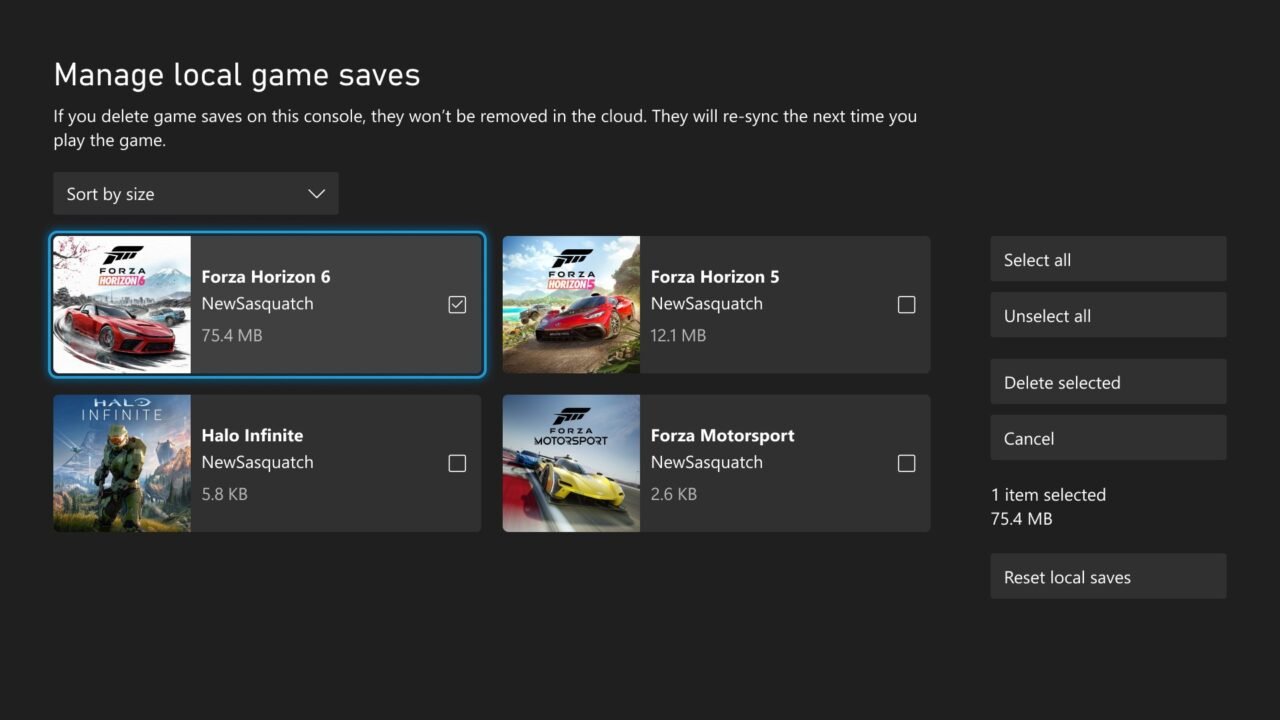
Your Xbox keeps a copy of your game saves on the console as well as in the cloud. If that local storage fills up, a game may not be able to save new progress. Since the October 2026 Xbox update, you can view, sort and delete local saves for games you’re not playing, either one at a time or all at once. This works on Xbox Series X|S and Xbox One.
Will deleting local saves delete my progress?
No, as long as your saves have synced. Game saves are backed up to the Xbox network automatically while you’re connected, and the cloud copy syncs back down the next time you launch the game. The Manage local game saves screen itself says that saves you delete from the console won’t be removed from the cloud and will re-sync the next time you play.
The one thing to watch is a save that hasn’t uploaded yet, for example after playing offline. Check the sync status first (see below).
How to check a game’s save is synced
- Highlight the game anywhere on your console, such as Home or My games & apps.
- Press the Menu button and select Game card.
- Highlight the game’s box art to see the save sync status.
The status shows whether your saves are syncing, fully in sync, out of sync, or stuck on another device or offline. If a save is out of sync, connect to the internet and launch the game so it can upload before you delete anything.
How to delete local saves on Xbox
- Press the Xbox button to open the guide.
- Select Profile & system > Settings.
- Go to System > Storage > Manage local game saves.
- Use the sort menu to order your saves, for example by size, to find the biggest ones.
- Select the save for each game you want to remove, or choose Select all to pick every unused save.
- Select Delete selected.
Only saves that aren’t currently in use can be deleted, so close the game first if you want to remove its save.
Shortcut from a storage warning
If a game tells you there isn’t enough space to create a new save, the warning now includes a direct link to the same Manage local game saves screen.
Other ways to free up save space
The Storage settings page has two older options as well:
- Clear local saved games deletes all game saves on the console’s storage. They’re still saved in the cloud.
- Clear local Xbox 360 storage deletes Xbox 360 game saves stored on the console. They stay in the cloud.
You can also manage a single game’s saved data from My games & apps: highlight the game, press the Menu button, select Manage game & add-ons and then the Saved data box. Xbox describes this as the way to delete saves you no longer want, rather than as a console-only clean-up, so use Manage local game saves if you want to keep the cloud copy.
Troubleshooting
I can’t find Manage local game saves
The option arrived in the October 2026 system update. Check your console is up to date with our guide on how to update your Xbox.
My saves didn’t come back
Cloud saves only download when you’re connected to the Xbox network as you start the game. If you see a sync error, Xbox Support’s cloud save sync errors page explains each message. For supported games, you can also restore an older cloud save.
Do I need Game Pass or a subscription for cloud saves?
No. Cloud saves work for anyone signed up to the Xbox service, with or without a subscription.