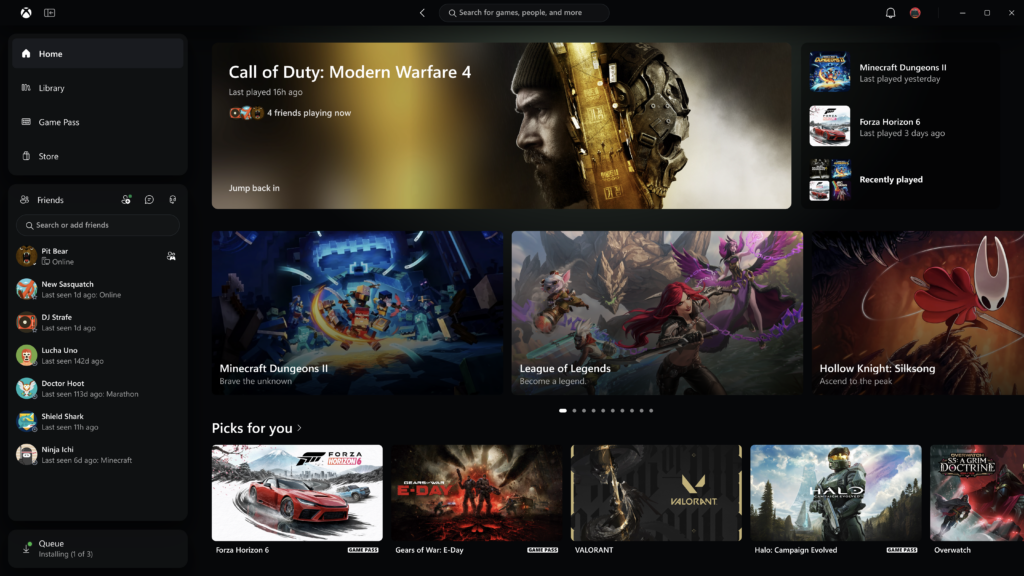
Good news if you’ve ever stared at the Xbox PC app’s loading screen long enough to question your life choices: Xbox is making it a lot quicker. Starting today, Xbox Insiders can try an updated Xbox PC app that Microsoft says launches up to 60% faster, with a tidier Library, Friends promoted to the main navigation and much better search.
Xbox CEO Asha Sharma flagged the update on X, and the full details landed on Xbox Wire from Jason Beaumont, VP of Xbox Experiences. It’s not just the PC app either – the refreshed Xbox cloud gaming web experience is heading to more players, and the same look is starting to reach cloud gaming apps on supported TVs and VR headsets.
We’re making XBOX on Windows faster and more responsive. Starting today, we’re rolling out updates that make our app up to 60% faster. A meaningful improvement, with plenty more to do.
— Asha Sharma (@asha_shar) November 5, 2026
How much faster is the Xbox PC app?
According to Xbox, the updated app:
- Launches up to 60% faster.
- Loads Home, Store and Game Pass pages up to 50% faster.
- Opens in-app windows up to 65% faster.
The usual small print applies: those figures are based on Xbox’s own testing and “may vary by device, internet connection, system configuration, usage, and other factors”. Still, the side-by-side video Asha Sharma shared is hard to argue with. Running on an ASUS ROG Ally, the new app reaches a usable Home screen in roughly 5.2 seconds, against around 15.6 seconds for the current version. That’s about a third of the wait.
What else is new in the Xbox PC app
- An easier Library: simpler navigation, updated filters and new ways to organise your games.
- Friends in the main navigation: see what friends are playing, start a chat or join a party without digging around.
- Better search: one search across games (including installed titles and add-ons) and people.
- A cleaner look: refreshed game cards, Home, Settings and animations.
Refreshed Xbox cloud gaming on the web
The refreshed web experience that Insiders have been previewing earlier this year will roll out automatically to more players over the next few weeks. Impatient? Head to play.xbox.com to try it now. The highlights:
- A new Library tab that pulls together every game you can play via the cloud, whether you own it or have it through Xbox Game Pass, with sorting and filters for recently played, genre, input options and more.
- Desktop mode, which makes better use of space on PCs and bigger displays.
- Dark and light modes, plus five new high-contrast options.
Xbox is also beginning to bring the same refreshed look and navigation to its cloud gaming apps on supported TVs and VR headsets, so finding your games and jumping in should feel the same whichever screen you’re on.
How to try the new Xbox PC app now
The faster app is with Xbox Insiders first. To join on Windows PC, download the Xbox Insider Hub, then go to Previews → PC gaming → Join. Feedback can go to aka.ms/XBOXplayervoice.
Where this fits
Xbox’s own pitch is making things “faster, simpler, and more familiar wherever you play”, and that lines up neatly with its broader push to make Windows feel more console-like, from Xbox Mode to the ROG Xbox Ally handhelds. It’s the same direction of travel as Project Helix, the next-gen Xbox designed to play Xbox and PC games. To be clear, today’s announcement doesn’t mention Helix at all – but a snappier Xbox app on Windows is hardly bad groundwork. Catch up on what we know in our Project Helix round-up.