Automatic Super Resolution is officially out of preview on the ROG Xbox Ally X and the ROG Xbox Ally X20.
Microsoft announced the change today in a DirectX blog post. Auto SR is also now available on select Windows Copilot+ PCs powered by AMD Ryzen. The feature first arrived on the Ally X in April as an Xbox Insider preview for docked play only.
Auto SR on the ROG Xbox Ally X and X20
- Available today: official Auto SR, including handheld play (even on battery) and support for games running at 1080p
- Also available today: select Windows Copilot+ PCs powered by AMD Ryzen
- Rolling out with Windows updates: Performance Mode, which Microsoft says can run up to 120 FPS, and using Auto HDR together with Auto SR. These may take a little time to reach your device
It now works in handheld mode
During the Xbox Insider preview, Auto SR only worked while the Ally X was docked. Microsoft says it started there because that is where the feature makes the biggest difference: a sharper picture on a TV or monitor, alongside smoother frame rates. After feedback from players, Auto SR now also works on the built-in screen, including when you are unplugged and playing on battery.
1080p support, and a new Performance Mode
Many games on a handheld default to 1080p to match the built-in screen. In the preview, you had to lower a game’s resolution before Auto SR would turn on, which was easy to miss. Auto SR now works with games running at 1080p. Microsoft says that if you dock to a higher-resolution TV or monitor, it can upscale a game to up to 1440p. It also notes that 1080p on the internal screen “may not be as optimal as other configurations”, but you should still see visual improvements, especially in older games.
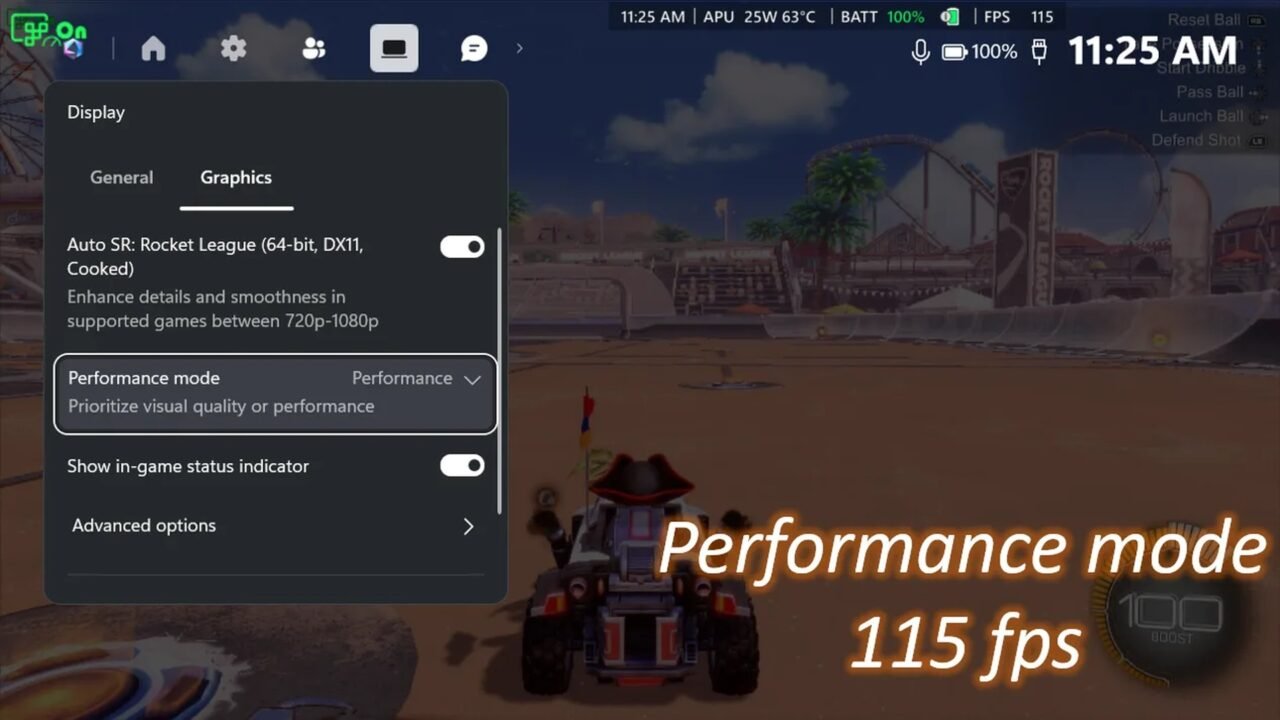
Until now, Microsoft says Auto SR topped out at around 60 to 75 FPS. A new Performance Mode raises that limit to up to 120 FPS. Once it reaches your device, you can switch between Quality and Performance in Game Bar while a game is running. Those figures are Microsoft’s. In screenshots from Rocket League on a ROG Xbox Ally X, running at 720p with the in-game graphics set to high, it shows Quality Mode averaging 70 FPS and Performance Mode averaging 115 FPS. We have not tested the feature ourselves.
Performance Mode, and the ability to use Auto HDR at the same time as Auto SR, will roll out with Windows updates. Auto HDR is the Windows feature that adds brighter highlights and richer colours to games without native HDR when you are on an HDR display. Previously you had to choose one or the other. Microsoft says the two now work together on an HDR TV, monitor or the ROG Xbox Ally X20, once the update reaches your device.
How to turn it on
Microsoft’s steps are:
- Update Game Bar and install the latest Windows 11 updates.
- Download or update the Auto Super Resolution Package from the Microsoft Store.
- Open Game Bar, or press the Xbox button (Win + G on a keyboard), and go to Widgets menu > Display > Graphics.
- Pick Quality or Performance. You can switch at any time while you play, once Performance Mode has reached your device.
Microsoft thanks the Xbox Insider community for using Auto SR during the preview, and says that feedback helped shape this release. You can send more thoughts to autosr@microsoft.com, or report issues in Feedback Hub under Game Performance, with “Auto SR” in the title.
Official sources: DirectX Developer Blog · Xbox Wire (April preview)